 XelToFab
Pipeline Overview
How the XelToFab pipeline processes scalar fields into meshes
The pipeline
XelToFab processes design optimization output through six main stages, with an optional SDF evaluation intake path:
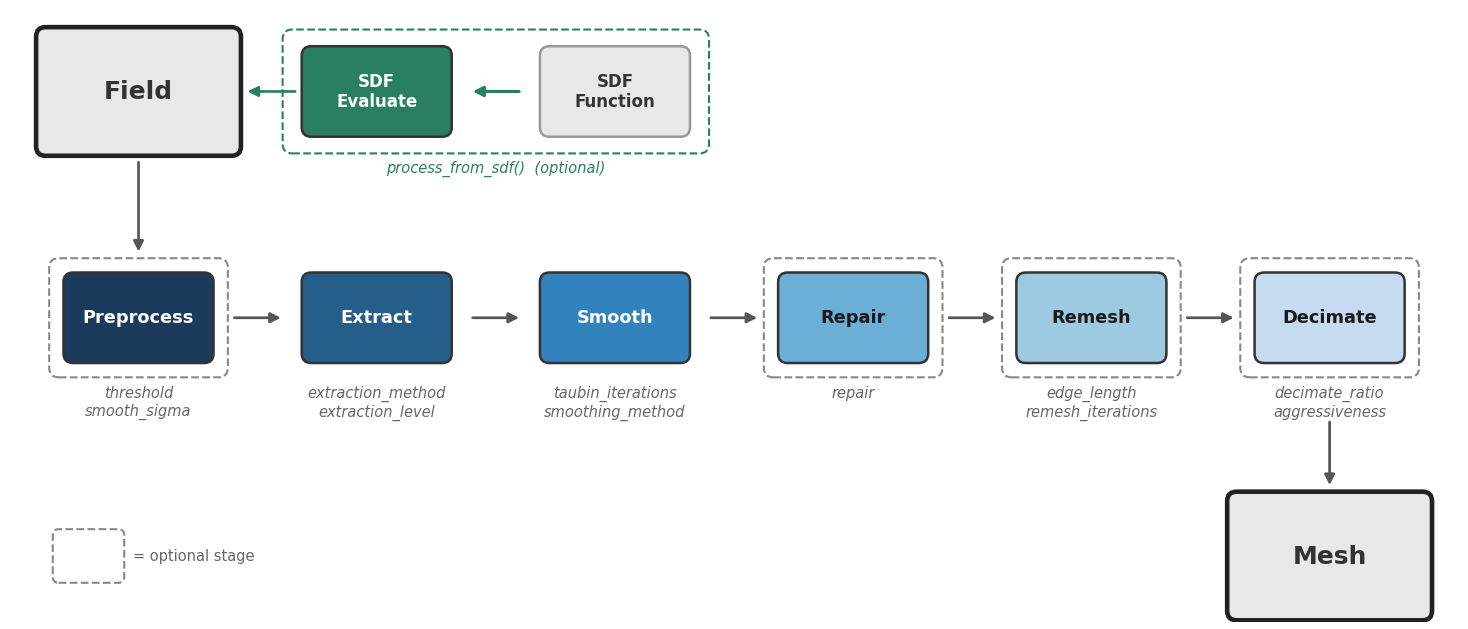
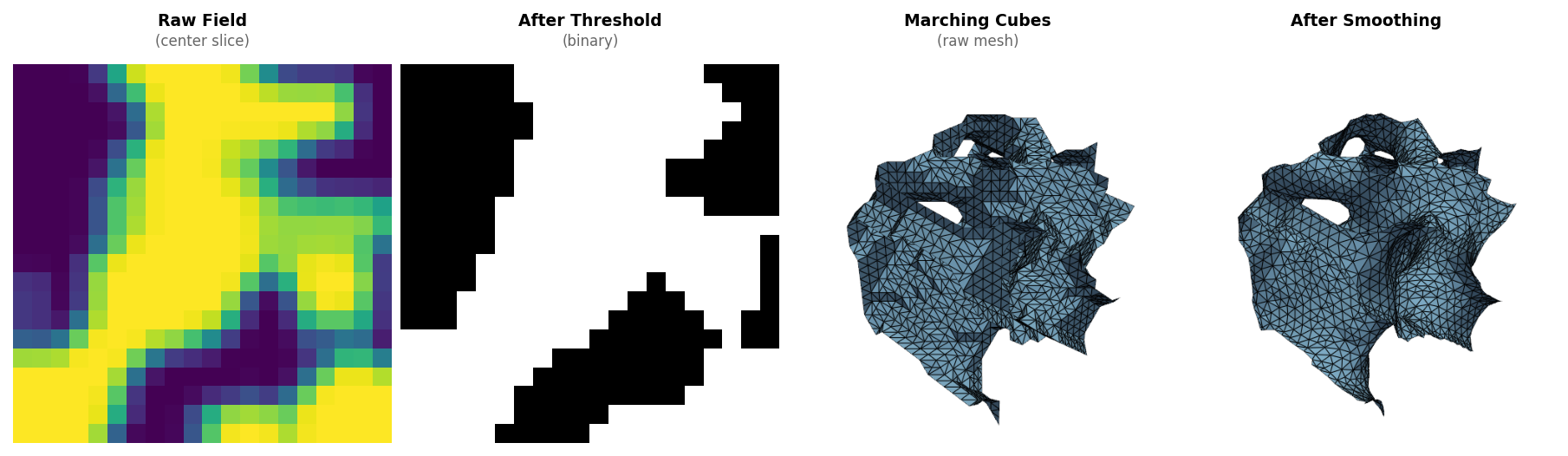
The orchestrator in pipeline.py chains these stages:
from xeltofab.pipeline import process

result = process(state)  # preprocess -> extract -> smooth -> repair -> remesh -> decimate
For SDF functions (neural models, analytical formulas), use process_from_sdf to evaluate the function on a grid first:
from xeltofab.pipeline import process_from_sdf

result = process_from_sdf(my_sdf, bounds=(-1, -1, -1, 1, 1, 1), resolution=128)
This evaluates the SDF on a uniform grid (or an adaptive octree grid with adaptive=True), then feeds into the same pipeline stages. See the SDF Functions guide for details.
PipelineState threading pattern
All stage functions follow the same signature:
def stage(state: PipelineState) -> PipelineState:PipelineState is a Pydantic model that carries both the data and configuration through the pipeline. Stage functions never mutate the input state. Instead, they return a new state using model_copy(update={...}):
# Inside a stage function:
return state.model_copy(update={"vertices": new_verts, "faces": new_faces})
This creates a shallow copy with the specified fields replaced. Because copies share numpy arrays with the original, stage functions must always create new arrays rather than modifying existing ones in-place.
State fields
| Field | Type | Set by |
|---|---|---|
field | ndarray | User input (loaded from file) or generated by process_from_sdf() |
ndim | int | Auto-computed from field.ndim (2 or 3) |
params | PipelineParams | User input (or defaults) |
binary | ndarray | None | preprocess() |
volume_fraction | float | None | preprocess() |
contours | list[ndarray] | None | extract() (2D only) |
vertices | ndarray | None | extract() (3D only) |
faces | ndarray | None | extract() (3D only) |
smoothed_vertices | ndarray | None | smooth() (3D only) |
The best_vertices property
PipelineState provides a best_vertices property that returns smoothed_vertices if smoothing has been applied, otherwise falls back to the raw vertices from extraction:
vertices = state.best_vertices # smoothed if available, raw otherwiseThis is used by save_mesh() and the visualization functions, so you always get the best available mesh quality without checking manually.
Direct extraction mode
When direct_extraction=True, the preprocessing stage is skipped entirely. Extraction operates on the continuous input field instead of a binarized version:
from xeltofab.state import PipelineParams

# Skip preprocessing, extract at level 0.3
params = PipelineParams(direct_extraction=True, extraction_level=0.3)
This is the default behavior for SDF fields (field_type="sdf"), where the input is already a clean continuous field and binarization would degrade quality. For density fields, direct extraction can be useful when the solver output is already well-converged and does not need cleanup.
In direct mode, the pipeline skips preprocessing and runs: extract → smooth → repair → remesh → decimate.
2D vs 3D paths
The pipeline automatically detects whether the input is 2D or 3D based on field.ndim:
| Dimension | Preprocessing | Extraction | Smoothing | Output |
|---|---|---|---|---|
| 2D | Same (Gaussian, threshold, morphology with disk kernel) | find_contours (marching squares) | No-op for smooth/repair/remesh/decimate | Contour arrays in state.contours |
| 3D | Same (Gaussian, threshold, morphology with ball kernel) | marching_cubes | Taubin or bilateral smoothing, repair, remesh, decimate | Triangle mesh in state.vertices / state.faces |
For 2D fields, save_mesh() is not supported — process() produces contours, not a 3D mesh. Two options:
- To visualize the contours, use
plot_resultorplot_comparisonfromxeltofab.field_plots. - To build a 3D triangle mesh from the same 2D input (for printing, laser cutting, or downstream CAD), use
extrude_2d()— an independent 2D→3D path that returns a watertighttrimesh.Trimeshyou can write withmesh.export(...).
Stage details
SDF Evaluate (sdf_eval.py) — optional intake
When using process_from_sdf(), the SDF function is evaluated on a grid before entering the main pipeline. This stage is skipped entirely when using process() with pre-evaluated grid data.
| Mode | Behavior |
|---|---|
adaptive=False (default) | Uniform grid evaluation, one Z-slab at a time |
adaptive=True | Octree coarse-to-fine refinement, ~O(N²) evaluations |
The output is a dense numpy array that feeds into the same extraction pipeline as any grid-loaded field. See the SDF Functions guide for details on the evaluation modes.
Preprocess (preprocess.py)
- Gaussian smoothing --
scipy.ndimage.gaussian_filterwith configurablesmooth_sigma - Thresholding -- Binarize at the configured
thresholdvalue - Morphological cleanup -- Opening then closing with a disk (2D) or ball (3D) structuring element of radius
morph_radius - Small component removal --
skimage.morphology.remove_small_objectsremoves components smaller than 0.5% of the total field size (minimum 8 pixels/voxels)
Sets state.binary and state.volume_fraction.
Extract (extract.py)
Dispatches to the configured extraction_method:
| Method | Backend | Best for |
|---|---|---|
mc (default for density) | scikit-image marching cubes | Density fields, general use |
dc (default for SDF) | Vendored sdftoolbox (CPU) or isoext (GPU) | SDF fields with sharp features |
surfnets | Vendored sdftoolbox | SDF fields, smooth output |
manifold | manifold3d | Watertight output for FEA/CAD |
- 2D: Always uses
skimage.measure.find_contoursregardless ofextraction_method - Extraction level defaults to
thresholdfor density and0.0for SDF, overridable withextraction_level
In preprocessed mode, extraction operates on the binary field. In direct mode, it operates on the original continuous scalar field.
See the Extraction Methods guide for details, GPU benchmarks, and examples.
Smooth (smooth.py)
XelToFab provides two mesh smoothing methods, selectable via smoothing_method:
Taubin smoothing (default for MC) applies alternating shrink/inflate passes using trimesh's filter_taubin. This band-pass filter removes high-frequency extraction artifacts while preserving low-frequency shape and volume. Best for general-purpose smoothing where uniform treatment of the surface is acceptable.
Smart smoothing defaults: When extraction_method is dc or surfnets, the pipeline auto-selects bilateral smoothing with 5 iterations (vs 20 for MC) to preserve sharp features. Override with explicit smoothing_method and taubin_iterations.
Configurable via taubin_iterations (default: 20) and taubin_lambda (default: 0.5).
Bilateral filtering (smoothing_method="bilateral") weights each vertex displacement by both spatial proximity and normal similarity of its neighbors. Neighbors across sharp edges have divergent normals and receive near-zero weight, so the filter smooths flat regions while preserving structural features like corners, ridges, and thin walls. Per-iteration volume correction counters the inherent shrinkage of Laplacian-family smoothers.
Configurable via bilateral_iterations (default: 10), bilateral_sigma_s (spatial reach; default: auto from average edge length), and bilateral_sigma_n (normal similarity threshold in radians; default: 0.35).
For 2D contours, both methods are a no-op.
Repair (repair.py)
Fixes non-manifold edges and vertices using pymeshlab. This ensures the mesh is valid for downstream operations (remeshing, decimation, FEA simulation). Enabled by default; disable with repair=False or --no-repair.
For 2D contours, this is a no-op.
Remesh (remesh.py)
Isotropic remeshing via gpytoolbox.remesh_botsch (Botsch & Kobbelt algorithm). Replaces the extraction triangulation with uniform, well-shaped triangles. After remeshing, 99%+ of faces meet FEA quality targets (min angle >20°).
Configurable via target_edge_length (default: auto from mesh bounding box) and remesh_iterations (default: 10). Enabled by default; disable with remesh=False or --no-remesh.
For 2D contours, this is a no-op.
Decimate (decimate.py)
QEM (Quadric Error Metrics) mesh decimation via pyfqmr. Reduces face count while minimizing geometric error through intelligent edge collapse. Runs after remeshing to optimize the uniform triangle mesh for file size and simulation efficiency.
Control the target with either target_faces (absolute face count) or decimate_ratio (proportional reduction, default 0.5 = 50%). The decimate_aggressiveness parameter (1--10, default 7) controls error tolerance. Boundary edges are preserved to protect domain boundaries.
Enabled by default; disable with decimate=False or --no-decimate.
For 2D contours, this is a no-op.
Interactive examples
A mesh extracted from a 3D heat conduction topology optimization result:
| Input | Output | Params |
|---|---|---|
| 51×51×51 density field | 7,087 vertices, 13,910 faces | default pipeline |
A synthetic sphere generated from a density field after full pipeline processing:
| Input | Output | Params |
|---|---|---|
| 100×100×100 density field | 1,307 vertices, 2,610 faces | default pipeline |