 XelToFab
Field Types
Scalar field types and how field_type affects pipeline behavior
Overview
XelToFab supports two types of input scalar fields, configured via the field_type parameter:
| Field type | Typical source | Value range | Extraction level |
|---|---|---|---|
density (default) | Design optimization solvers (SIMP, BESO), occupancy networks | [0, 1] | 0.5 (at threshold) |
sdf | Neural SDF models (DeepSDF, NITO, NTopo) | unbounded (negative inside, positive outside) | 0.0 (zero level set) |
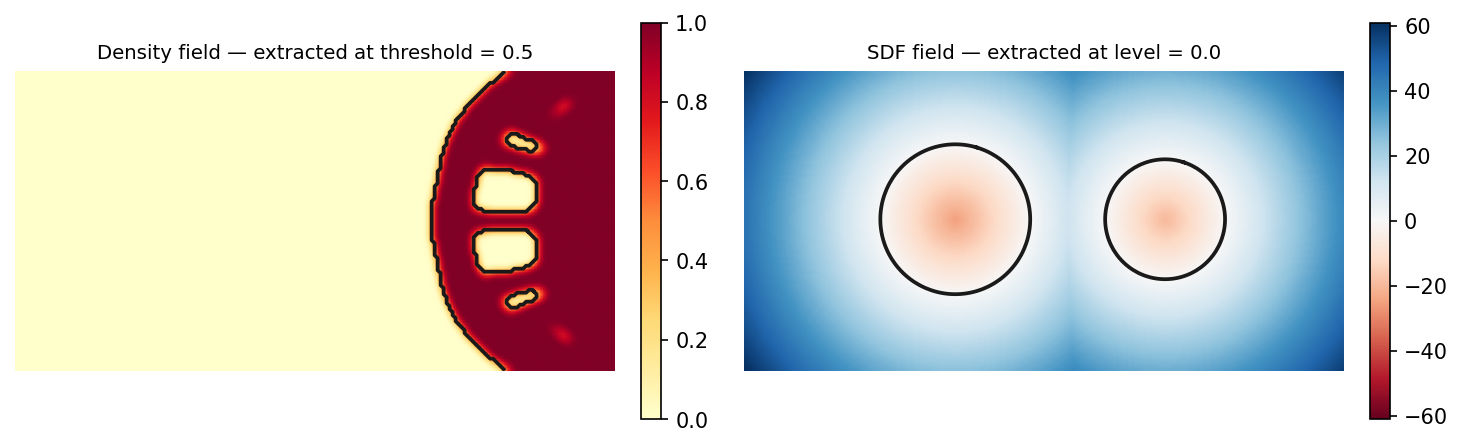
Density fields
Density fields contain continuous values in [0, 1] where higher values indicate material presence. This is the standard output format from topology optimization solvers such as SIMP and BESO.
from xeltofab.state import PipelineParams

params = PipelineParams(field_type="density")  # this is the default
Default behavior for density fields
- Preprocessing is enabled -- The field is Gaussian-smoothed, thresholded to binary, and cleaned with morphological operations
smooth_sigma = 1.0-- Gaussian smoothing helps reduce noise in the scalar field before binarizationdirect_extraction = False-- Extraction operates on the preprocessed binary field- Extraction level =
threshold(default 0.5) -- The extraction isovalue
This pipeline works well for raw design optimization output where density values may be noisy or have intermediate values that need cleanup.
SDF fields
Signed distance fields encode the distance to the surface boundary. By convention, negative values are inside the object and positive values are outside (or vice versa depending on the model). The surface is at the zero level set.
from xeltofab.state import PipelineParams

params = PipelineParams(field_type="sdf")
SDF functions
For callable models rather than pre-evaluated grids, see the SDF Functions guide for how to use process_from_sdf() with neural networks, ONNX models, and analytical formulas.
Smart defaults for SDF fields
When field_type="sdf" is set, the pipeline automatically adjusts defaults (unless you explicitly override them):
direct_extraction = True-- Preprocessing is skipped. SDF fields are typically clean continuous outputs that do not benefit from thresholding or morphological operationssmooth_sigma = 0.0-- Gaussian preprocessing is disabled. The field is already smooth- Extraction level = 0.0 -- The zero level set, which is the surface boundary in an SDF
extraction_method = "dc"-- Dual contouring leverages SDF gradients for sharp feature preservationsmoothing_method = "bilateral",taubin_iterations = 5-- Reduced smoothing for DC to preserve sharp features (vs taubin/20 for MC)
Overriding SDF defaults
The smart defaults only apply to values you have not explicitly set. You can override any of them:
# SDF field, but keep Gaussian smoothing at sigma=0.5
params = PipelineParams(field_type="sdf", smooth_sigma=0.5)

# SDF field with preprocessing enabled
params = PipelineParams(field_type="sdf", direct_extraction=False)
Extraction level
The extraction level is the isovalue passed to the extraction method (MC, DC, SurfNets, or manifold for 3D) or find_contours (2D). It determines which isosurface in the field becomes the mesh boundary.
The default depends on field type:
| Field type | Default extraction level | Reasoning |
|---|---|---|
density | Value of threshold (default 0.5) | The 50% contour separates material from void |
sdf | 0.0 | The zero level set is the surface boundary |
Override it explicitly for non-standard cases:
# Extract at a lower density threshold
params = PipelineParams(threshold=0.3)

# Extract SDF at a non-zero offset (expand/shrink the surface)
params = PipelineParams(field_type="sdf", extraction_level=0.1)
The effective level is always available via params.effective_extraction_level.
Bridging SDF and density
If you already have an SDF array and a downstream consumer expects a density field (e.g. a density-only TO benchmark such as EngiBench), convert it with sdf_to_density(). Three conversion profiles are provided — heaviside, linear (default), and sigmoid — all sharing the invariant that sdf == level → density == 0.5, so extracting the result at iso=0.5 recovers the input iso-surface.
How the profiles differ
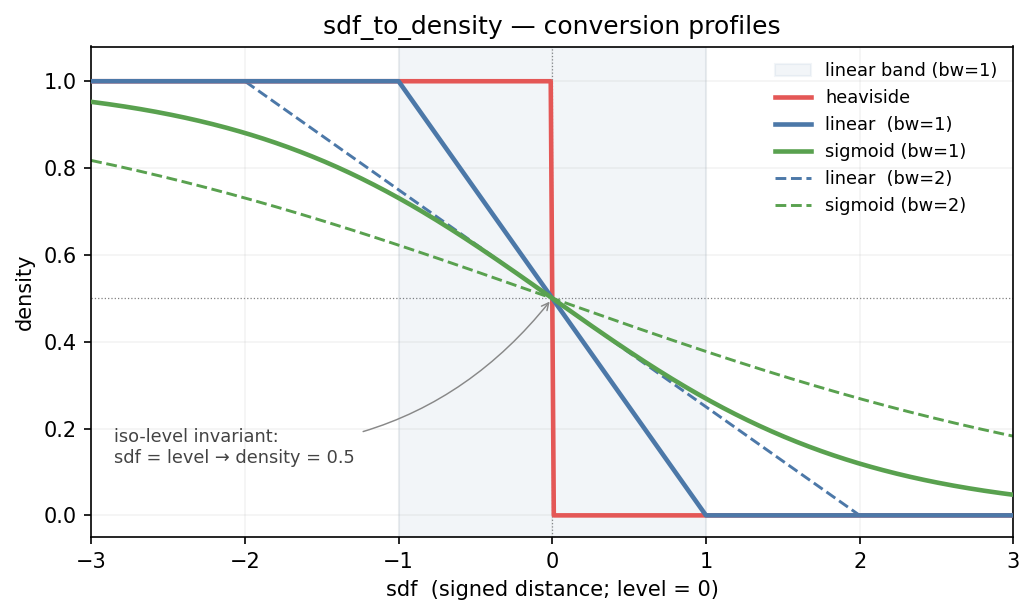
All three methods cross density = 0.5 at the iso-level (here sdf = 0), so the zero-level-set is preserved in the continuous limit. They differ in the transition region:
heavisideis a hard step — density is either 0 or 1 (except exactly at the iso-level, where it is 0.5). It carries no sub-voxel information about how close a point is to the surface.linearramps linearly across[level − bandwidth, level + bandwidth]and is exactly 0 or 1 outside that band. The shaded region on the plot shows thebw=1band; the dashed line shows the same profile atbw=2. Bandwidth is the half-width of the transition.sigmoidis a smooth tanh-like profile with infinite support — mathematically it is never exactly 0 or 1, though it saturates at float64 extremes. Bandwidth controls steepness:bw=1is sharper thanbw=2.
What the extracted mesh reveals
Marching cubes at iso=0.5 performs linear interpolation along cube edges to place vertices at sub-voxel positions. That interpolation reads only two numbers per surface-crossing edge — the densities on each side — so the mesh depends on the conversion method only through those two values.
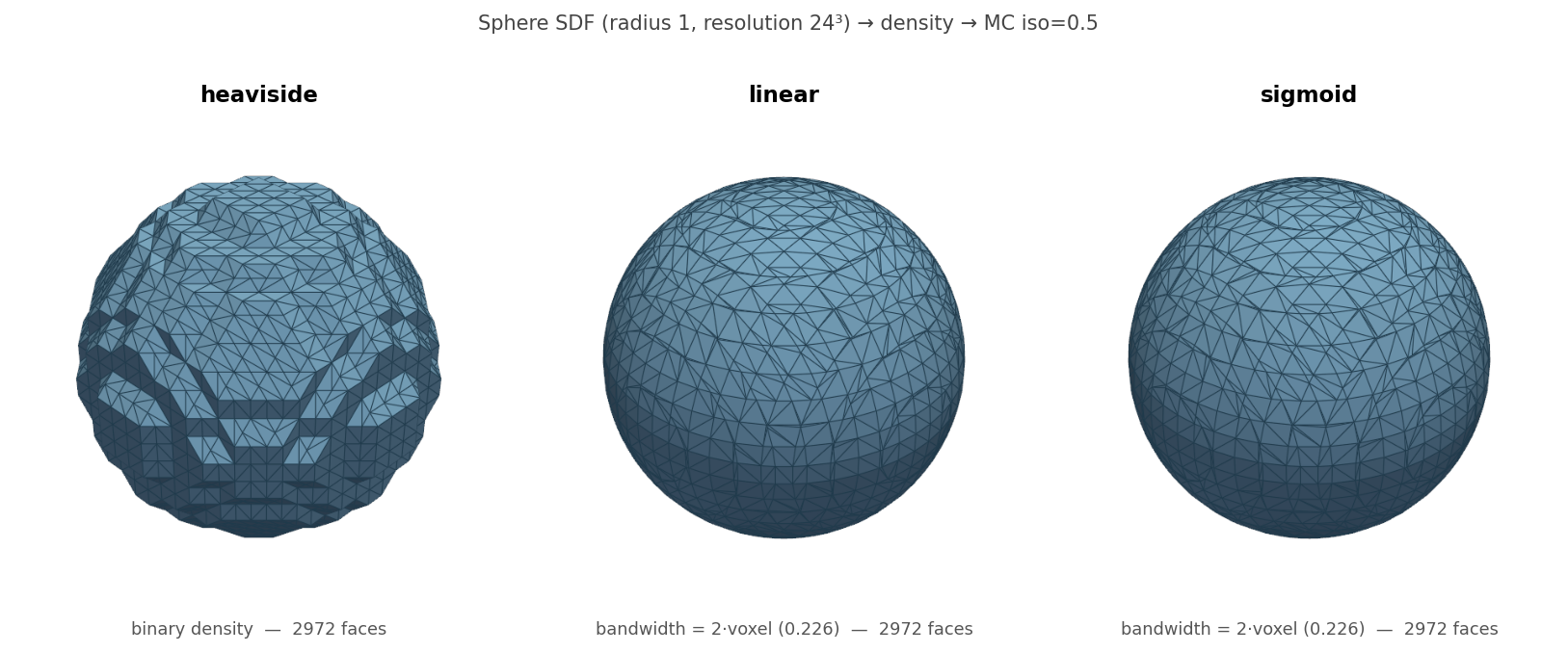
The three panels above all start from the same 24³ SDF of a unit sphere and extract at iso=0.5 with no smoothing, repair, remeshing, or decimation — so every visible difference is attributable to the conversion method.
heaviside — the outlier
A blocky, voxel-aligned mesh. Because neighbouring voxel densities are always {0, 1}, the linear edge interpolation that MC uses always resolves to the midpoint — there is no sub-voxel information for MC to exploit. The voxel-grid faceting is visible as quadrilateral-scale patches in the left panel. This is the only method whose output differs from the others at the mesh level.
linear — accurate with compact support
A smooth, accurate sphere. The band-limited ramp across [−bw, +bw] gives MC a clean linear gradient to interpolate. Because the profile is piecewise linear and passes through (sdf=0, density=0.5), the 0.5-crossing MC computes is exactly the sdf=0 crossing (up to voxel quantization) — the method recovers the true iso-surface as well as any band-limited profile can.
sigmoid — smooth and differentiable
Visually identical to linear in this mesh. This is not an artifact of resolution — it is a mathematical consequence of how MC consumes the density field. Any monotonic profile that passes through (sdf=0, density=0.5) with a non-zero gradient at that point feeds MC the same effective surface crossing. Sigmoid differs from linear in its profile shape away from 0.5 (smooth tails vs clipped bulk), but those differences live outside the narrow region that controls MC vertex placement.
Seeing where linear and sigmoid actually differ
The extracted meshes match, but the underlying density fields do not. Visualising a 2D slice of the same unit-circle SDF makes the difference concrete:
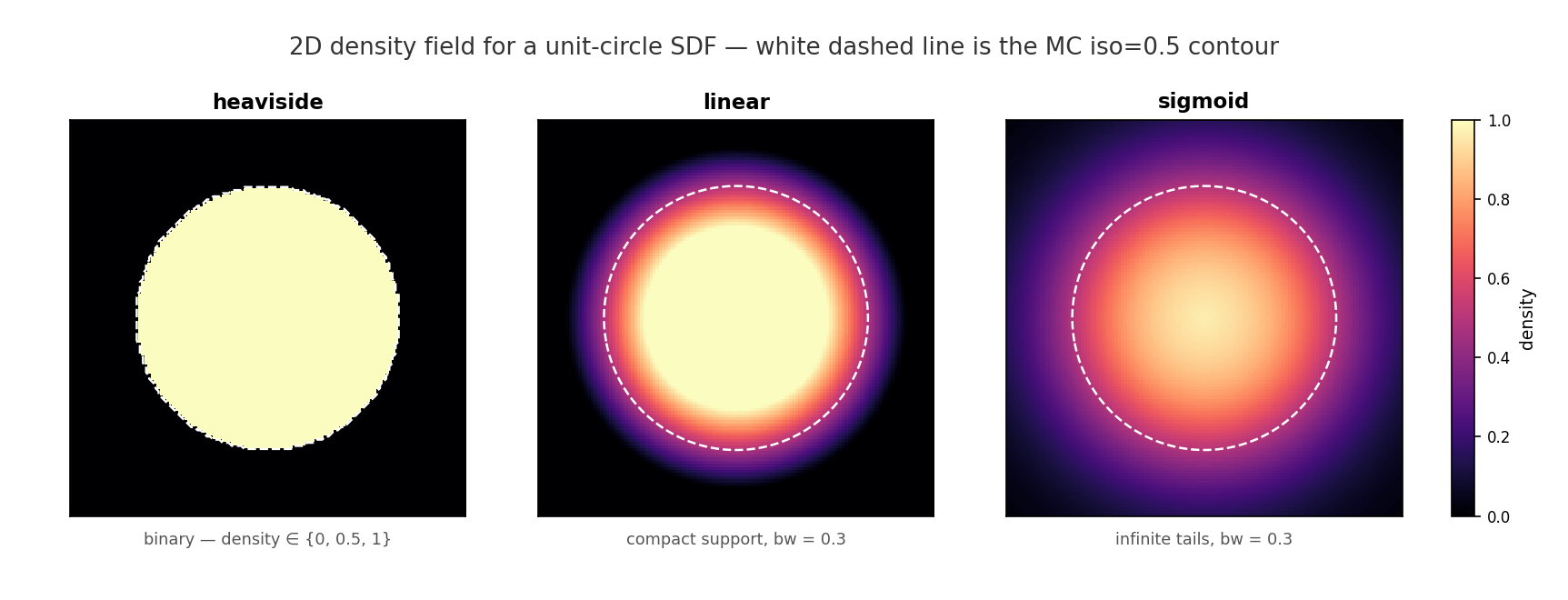
heavisideis binary — every pixel outside the surface is exactly 0, every pixel inside is exactly 1.linearhas compact support: the transition is confined to a band of half-widthbwaround the surface; outside that band the density is exactly 0 or 1. The sharp outer edge of the halo is thesdf = +bwboundary.sigmoidhas infinite tails: even at the corners of the slice the density is not quite 0. The halo has no outer edge.
The white dashed contour in every panel is the MC iso=0.5 line — and it traces the same unit circle in all three. That is why the extracted meshes coincide for linear and sigmoid. Anything that reads the density field other than by iso-contouring at 0.5 — volume-fraction integrals, Gaussian smoothing, gradient-based optimisation, extraction at a different iso-level — will see these halo differences and can yield distinct results.
Choosing a method
Since linear and sigmoid produce equivalent MC surfaces, the choice between them is about downstream use of the density field:
heaviside— when a consumer will threshold the field anyway, or when you want a binary representation and accept the voxel-aligned mesh.linear(default) — faithful surface with compact support: density is exactly 0 or 1 outside a finite band, so volume-fraction integralsnp.mean(density)are exact in the bulk.sigmoid— when the consumer is a gradient-based optimiser that needs aC∞profile (e.g. a TO solver using density projection filters). Note the infinite tails:np.mean(density)is biased upward relative to the true object volume, and the bias grows withbw.
When to use each type
Use density (default) when:
- Your input comes from a design optimization solver (e.g., SIMP, BESO, evolutionary methods)
- Values represent material density or occupancy probability in [0, 1]
- The field may have noise, intermediate values, or disconnected artifacts that need cleanup
Use sdf when:
- Your input comes from a neural implicit model (DeepSDF, NITO, NTopo, neural radiance fields)
- Values represent signed distance to the surface
- The field is already smooth and continuous -- preprocessing would degrade quality
- You want the zero level set as the surface
- Your input is a callable function (neural SDF, analytical formula) — use
process_from_sdf()withadaptive=Truefor large grids