 XelToFab
Parameters
Full PipelineParams reference with defaults, ranges, and tuning tips
PipelineParams reference
All pipeline behavior is configured through PipelineParams, a Pydantic model defined in xeltofab.state.
from xeltofab.state import PipelineParams

params = PipelineParams(
    threshold=0.5,
    smooth_sigma=1.0,
    morph_radius=1,
    taubin_iterations=20,
    taubin_lambda=0.5,
    smoothing_method="taubin",   # or "bilateral"
    field_type="density",
    direct_extraction=False,
    extraction_level=None,
    repair=True,
    remesh=True,
    decimate=True,
    decimate_ratio=0.5,
)
Full parameter table
| Parameter | Type | Default | Range | Description |
|---|---|---|---|---|
threshold | float | 0.5 | [0.0, 1.0] | Binarization threshold for preprocessing (e.g., density cutoff) |
smooth_sigma | float | 1.0 | >= 0.0 | Gaussian smoothing sigma applied before thresholding. Set to 0.0 to disable |
morph_radius | int | 1 | >= 0 | Radius of the morphological structuring element (disk for 2D, ball for 3D). Set to 0 to disable morphological cleanup |
taubin_iterations | int | 20 | >= 0 | Number of Taubin smoothing iterations on the extracted mesh. Set to 0 to disable |
taubin_lambda | float | 0.5 | (0.0, 1.0] | Shrinkage factor for Taubin smoothing. Higher values produce more smoothing per iteration |
smoothing_method | "taubin" | "bilateral" | "taubin" | -- | Mesh smoothing algorithm. Taubin for uniform smoothing; bilateral for feature-preserving |
bilateral_iterations | int | 10 | >= 1 | Number of bilateral filtering iterations |
bilateral_sigma_s | float | None | None | > 0.0 | Spatial weight reach. When None, auto-computed from average edge length |
bilateral_sigma_n | float | 0.35 | > 0.0 | Normal similarity threshold (radians). Smaller values preserve sharper features |
field_type | "density" | "sdf" | "density" | -- | Type of input field. Affects default values for other parameters |
direct_extraction | bool | False | -- | Skip preprocessing and extract directly from the continuous input field |
extraction_method | "mc" | "dc" | "surfnets" | "manifold" | "mc" | --extraction-method | Extraction algorithm. SDF smart default: "dc". DC/surfnets auto-set bilateral smoothing with 5 iterations |
extraction_level | float | None | None | -- | Explicit isovalue for extraction. When None, defaults to threshold for density or 0.0 for SDF |
repair | bool | True | -- | Enable watertight mesh repair (3D only, requires pymeshlab) |
remesh | bool | True | -- | Enable isotropic remeshing (3D only, requires gpytoolbox) |
target_edge_length | float | None | None | > 0.0 | Target edge length for remeshing. When None, auto-computed from mesh bounding box |
remesh_iterations | int | 10 | >= 1 | Number of Botsch & Kobbelt remeshing iterations |
decimate | bool | True | -- | Enable QEM mesh decimation (3D only, requires pyfqmr) |
target_faces | int | None | None | > 0 | Absolute target face count. When set, overrides decimate_ratio |
decimate_ratio | float | 0.5 | (0.0, 1.0] | Fraction of faces to keep (0.5 = reduce by 50%). Ignored when target_faces is set |
decimate_aggressiveness | int | 7 | [1, 10] | QEM edge collapse error tolerance. Higher values allow more aggressive reduction |
Computed property
| Property | Type | Description |
|---|---|---|
effective_extraction_level | float | The actual extraction level used: extraction_level if set explicitly, otherwise 0.0 for SDF or threshold for density |
Smart defaults by field type
When field_type="sdf" is set, certain parameters are automatically adjusted unless you explicitly provide a value:
| Parameter | Density default | SDF auto-default | Reasoning |
|---|---|---|---|
direct_extraction | False | True | SDF fields are clean; preprocessing would degrade them |
smooth_sigma | 1.0 | 0.0 | SDF fields are already smooth; Gaussian pre-smoothing is unnecessary |
extraction_level | threshold (0.5) | 0.0 | SDF surface is at the zero level set |
These overrides only apply when the parameter was not explicitly passed. If you set smooth_sigma=0.5 with field_type="sdf", your value is preserved.
Parameter tuning tips
Threshold

- Lower threshold (0.3-0.4): Includes more material, produces thicker features. Use when the solver was aggressive with material removal
- Higher threshold (0.6-0.7): Excludes more material, produces thinner features. Use when the solver left too much intermediate density
- The threshold only applies when
direct_extraction=False
Gaussian sigma

smooth_sigma=0.0: No Gaussian smoothing. Use for clean or already-smoothed fieldssmooth_sigma=0.5-1.0: Light smoothing. Good for most design optimization resultssmooth_sigma=2.0+: Heavy smoothing. Blurs fine features but removes more noise. Be cautious of thin features being smoothed away
Morphological radius
morph_radius=0: Disabled. Use when the field is clean or when you need to preserve fine detailmorph_radius=1: Default. Removes single-voxel noise and fills single-voxel holesmorph_radius=2-3: More aggressive cleanup. Can merge nearby features or break thin connections
Taubin smoothing
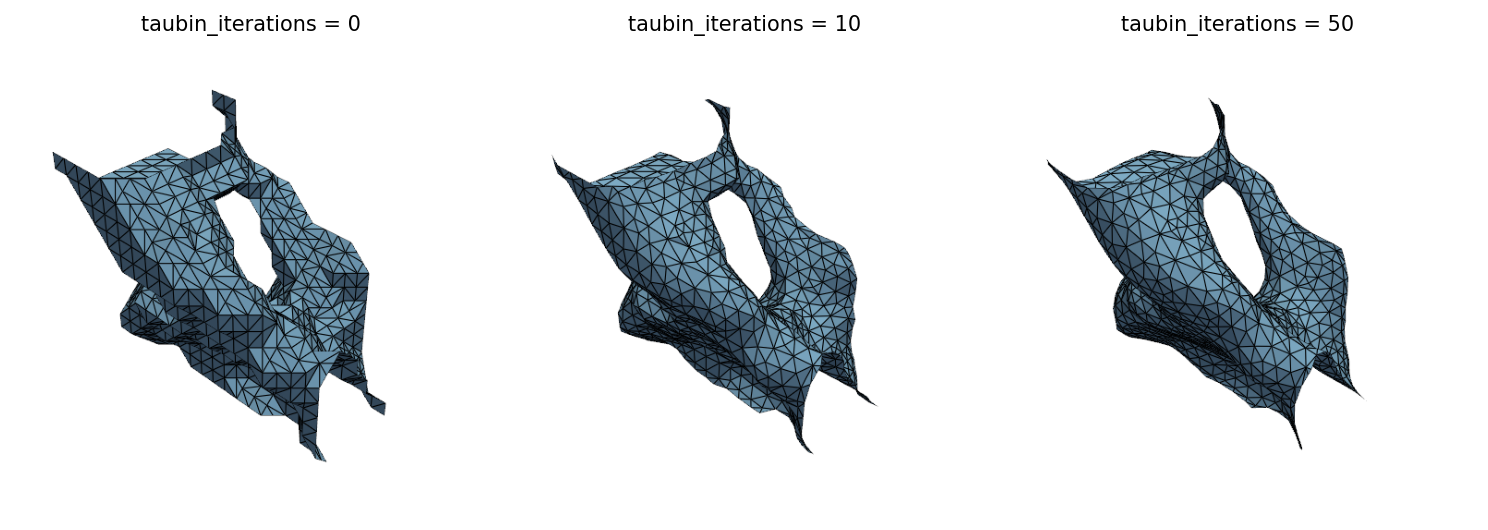
taubin_iterations=0: Disabled. Raw extraction output (staircase artifacts for MC, sharper for DC)taubin_iterations=10-20: Moderate smoothing. Good balance between quality and feature preservationtaubin_iterations=50+: Heavy smoothing. Produces very smooth surfaces but may lose sharp featurestaubin_lambda: Controls smoothing strength per iteration. The default of 0.5 works well for most cases. Lower values (0.1-0.3) produce gentler smoothing
Bilateral smoothing
Use smoothing_method="bilateral" when the mesh has sharp features (corners, ridges, thin walls) that should be preserved during smoothing:
bilateral_iterations=5-10: Default range. Fewer iterations than Taubin because bilateral filtering is more aggressive per iterationbilateral_iterations=1-3: Very light smoothing. Good for meshes that are already reasonably smoothbilateral_sigma_s: Controls how far the filter reaches.None(default) auto-computes from average edge length, which works well for most meshes. Set explicitly when you need finer controlbilateral_sigma_n=0.35: Default. Edges with >~40° normal deviation are preserved. Lower values (0.1-0.2) preserve more features but smooth less. Higher values (0.5-1.0) smooth more aggressively across features- When to use bilateral over Taubin: Bilateral filtering is best when the mesh has both smooth regions and sharp structural features. On uniformly smooth meshes (like spheres), Taubin produces comparable or better results with less volume drift
Decimation
QEM decimation reduces face count after remeshing. It runs by default with decimate_ratio=0.5 (50% reduction):
decimate=Falseor--no-decimate: Skip decimation entirely. Use when you need maximum geometric fidelity or the mesh is already at an acceptable face countdecimate_ratio=0.3: Keep only 30% of faces. Good for lightweight visualization meshesdecimate_ratio=0.8: Keep 80% of faces. Minimal reduction, maximum qualitytarget_faces=10000: Set an absolute face count limit. Useful when targeting a specific polygon budget for FEA or renderingdecimate_aggressiveness=3-5: Conservative decimation, slower but preserves more detaildecimate_aggressiveness=7-10: Aggressive decimation, faster with more approximation error
Direct extraction
Enable direct_extraction=True when:
- The input field is a clean SDF (automatically enabled for
field_type="sdf") - The solver has fully converged and density values are near 0 or 1
- You want to control the exact isovalue via
extraction_level
CLI mapping
CLI flags map to PipelineParams fields:
| CLI flag | Parameter |
|---|---|
--threshold | threshold |
--sigma | smooth_sigma |
--field-type | field_type |
--direct | direct_extraction |
--smoothing | smoothing_method |
--no-repair | repair=False |
--no-remesh | remesh=False |
--no-decimate | decimate=False |
The CLI preserves smart defaults: if you pass --field-type sdf without --sigma or --direct, the SDF defaults are applied automatically.
Parameters not exposed via CLI (morph_radius, taubin_iterations, taubin_lambda, extraction_level, target_edge_length, remesh_iterations, target_faces, decimate_ratio, decimate_aggressiveness) can be configured through the Python API.