 XelToFab
Extraction Methods
Choosing between Marching Cubes, Dual Contouring, Surface Nets, and manifold3d
Overview
XelToFab supports four mesh extraction methods, each with different trade-offs for sharp feature preservation, manifold guarantees, and performance:
| Method | Backend | Sharp Features | Manifold | GPU | Best For |
|---|---|---|---|---|---|
mc | scikit-image | No | Generally yes | No | Density fields, general use |
dc | sdftoolbox (CPU) / isoext (GPU) | Yes (QEF) | No | Yes | SDF fields with sharp features |
surfnets | sdftoolbox | No (smoother) | No | No | SDF fields, smooth output |
manifold | manifold3d | No | Watertight by design | No | FEA/CAD workflows, neural SDFs |
Smart defaults
The pipeline auto-selects extraction methods based on field type:
- SDF fields (
field_type="sdf") auto-selectdc(Dual Contouring) to leverage gradient information - Density fields (
field_type="density") keepmc(Marching Cubes) as the default
When DC or Surface Nets are selected, the smoothing parameters are also adjusted:
smoothing_methodswitches tobilateral(feature-preserving)taubin_iterationsreduces to5(from 20 for MC)
All defaults are overridable by explicitly setting the parameter.
Dual Contouring and sharp features
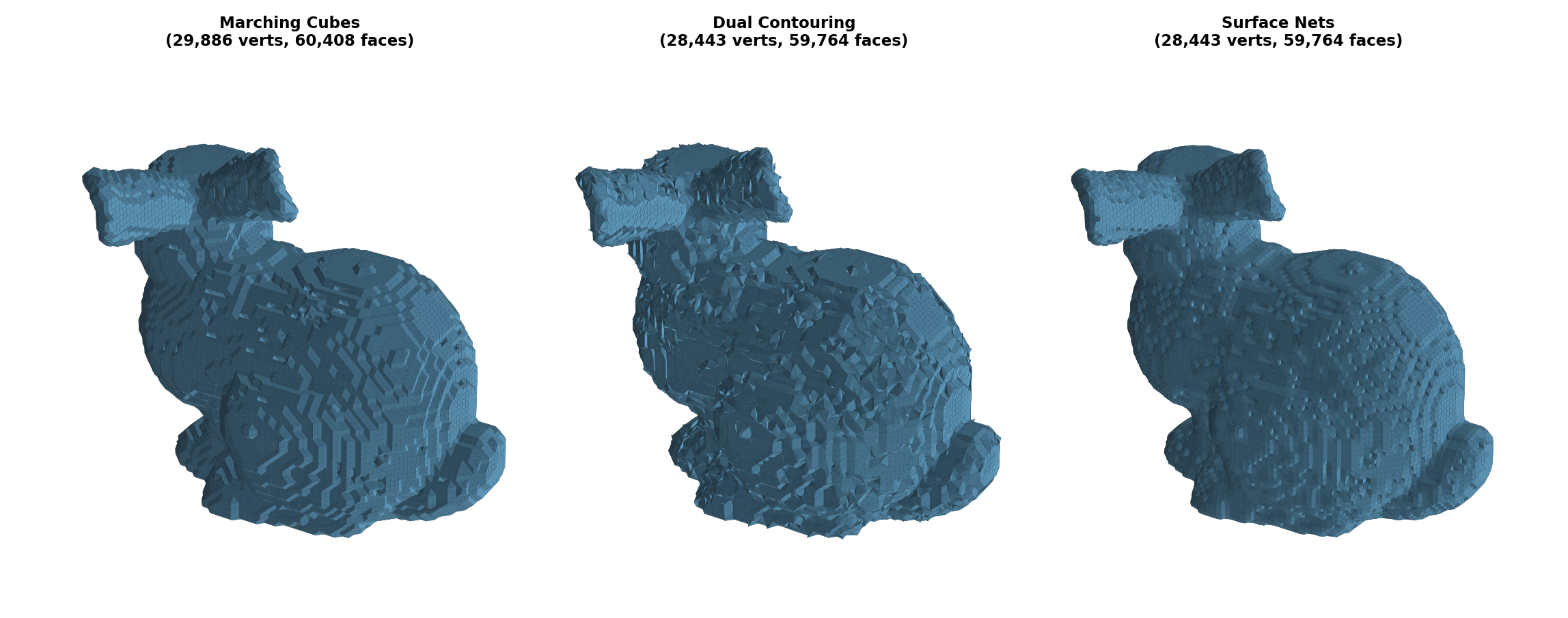
Marching Cubes places vertices on voxel edges via linear interpolation. This means sharp corners and edges are always rounded — MC cannot represent features sharper than a voxel.
Dual Contouring places one vertex per active voxel using a QEF (Quadric Error Function) solver. The QEF finds the point where tangent planes (derived from the SDF gradient) intersect, allowing DC to reconstruct sharp corners and edges that MC misses. This is why DC is the default for SDF fields.
Surface Nets places vertices at the centroid of edge crossings per voxel. This produces smoother results than MC's staircase pattern, but doesn't preserve sharp features like DC.
The smoothing reduction for DC/SurfNets (bilateral, 5 iterations instead of taubin, 20) prevents post-extraction smoothing from eroding the sharp features that DC recovered.
Gradient quality matters
DC's QEF solver relies on SDF gradients to determine vertex placement. The quality of DC output is directly proportional to the quality of the input gradients. With a proper SDF (e.g., from a neural model or compute_implicit_distance), gradients are smooth and consistent, producing clean DC meshes. With a noisy or approximate SDF (e.g., binary voxelization followed by distance transform), gradients are noisy and DC can produce rougher surfaces than MC.
| SDF source | Gradient quality | DC result |
|---|---|---|
| Neural SDF (DeepSDF, NITO) | Smooth (learned) | Excellent — DC > MC |
| Analytic SDF (sphere, box) | Exact | Excellent — DC preserves sharp features |
| Mesh → signed distance (VTK) | Good | Good — DC ≈ MC |
| Binary voxelization → EDT | Poor (staircase) | Poor — DC < MC |
The same Dual Contouring algorithm on the same Stanford bunny, with the only difference being SDF quality:
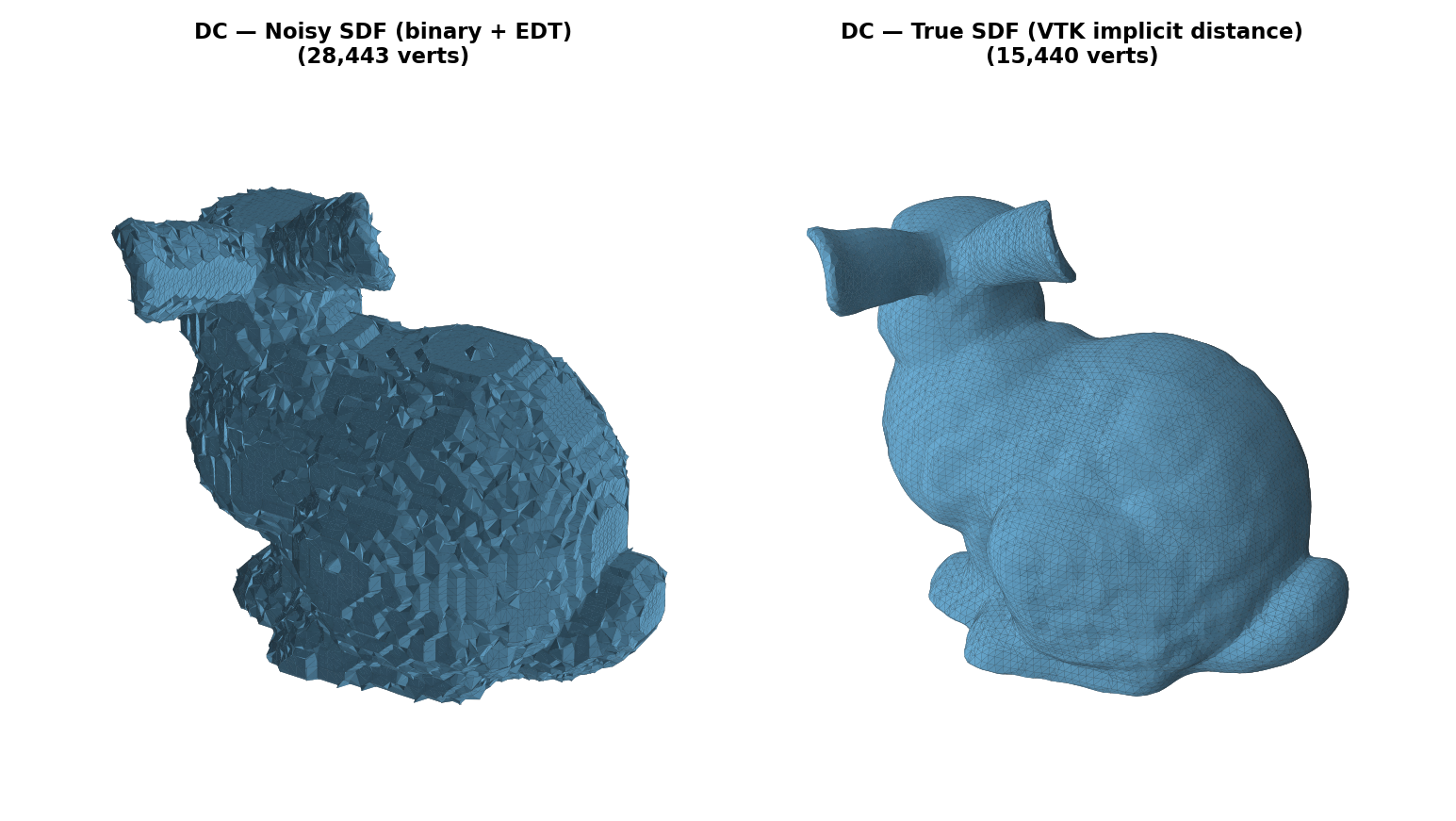
Recommendation: If your SDF comes from a binary voxelization or distance transform, use surfnets (robust averaging) or mc instead of dc. For neural SDF models, see the SDF Functions guide for extraction method selection advice.
GPU acceleration
DC extraction supports GPU acceleration via the isoext backend, which is auto-detected when available. The GPU path uses the same QEF-based Dual Contouring algorithm but runs the grid intersection and vertex placement on the GPU via CUDA.
Benchmark: Sphere SDF extraction (NVIDIA RTX 5080, 16 GB VRAM — results vary by GPU):
| Grid | Voxels | GPU (isoext) | CPU (vendored) | Speedup | Output |
|---|---|---|---|---|---|
| 100^3 | 1M | 0.02s* | 0.38s | — | 11.5K verts |
| 256^3 | 16.8M | 0.08s | 4.68s | 61x | 76.8K verts |
| 500^3 | 125M | 0.52s | 35.6s | 68x | 293K verts |
When to use GPU: Grids ≥ 200^3 where DC extraction takes multiple seconds on CPU. Below that, the CPU path is fast enough.
Install the GPU backend:
uv sync --extra cuda # requires CUDA toolkit + PyTorch with matching CUDA versionIf the GPU is unavailable (no CUDA, no isoext, or insufficient VRAM), DC automatically falls back to the CPU implementation with a logged warning:
UserWarning: GPU DC unavailable (...), falling back to CPUmanifold3d
The manifold method uses manifold3d's marching tetrahedra on a body-centered cubic grid. Its output is watertight by design, so the pipeline auto-skips the repair stage.
Trade-offs:
- Slower for pre-computed grid data (8-88x vs MC) due to Python callback overhead
- No sharp feature preservation (vertices placed on tetrahedra edges)
- Excellent for callable neural SDF functions (no callback overhead)
Install:
uv sync --extra manifoldWhen to use each method
- Density field from a TO solver →
mc(default, no action needed) - SDF with sharp edges/corners →
dc(auto-selected for SDF fields) - SDF wanting smooth output →
surfnets - Need guaranteed watertight mesh for FEA →
manifold - Large grid + GPU available →
dc(auto-uses GPU when isoext is installed)
Interactive comparison
Stanford bunny extracted with Marching Cubes (left) vs Dual Contouring (right). Rotate and zoom to compare surface quality:
Marching Cubes (15.5K verts)
Dual Contouring (15.4K verts)
Examples
Python API
from xeltofab.state import PipelineParams, PipelineState
from xeltofab.pipeline import process

# SDF field → auto-selects DC with bilateral smoothing
params = PipelineParams(field_type="sdf")
state = PipelineState(field=sdf_array, params=params)
result = process(state)

# Explicit Surface Nets
params = PipelineParams(extraction_method="surfnets")

# Guaranteed watertight output
params = PipelineParams(extraction_method="manifold")

# Override DC smoothing defaults
params = PipelineParams(
    field_type="sdf",
    taubin_iterations=20,       # back to full smoothing
    smoothing_method="taubin",  # override bilateral
)
CLI
# SDF field → auto DC
xtf process neural_sdf.npy -o mesh.stl --field-type sdf

# Explicit extraction method
xtf process field.npy -o mesh.stl --extraction-method dc

# Manifold output
xtf process sdf.npy -o mesh.stl --extraction-method manifold --field-type sdf

# Surface Nets
xtf process sdf.npy -o mesh.stl --extraction-method surfnets --field-type sdf